CodeTyper CLI: Building an AI Coding Agent That Actually Learns From Your Feedback
I've been obsessed with a simple question for months: What if your AI coding assistant could actually get smarter the more you use it?
Not in a vague "machine learning" way, but in a practical sense—learning which AI provider handles your refactoring tasks better, which one writes cleaner tests, and automatically routing your requests to the right model. That obsession led me to build CodeTyper CLI, an open-source terminal-based AI coding agent that works with both GitHub Copilot and local Ollama models.
In this post, I'll walk you through how it works, why I built the cascading provider system, and how you can start using it today—whether you have a Copilot subscription or prefer running models locally.
The Problem With Current AI Coding Tools
Here's what frustrated me about existing tools: they're static. You pick a model, you use it, and if it sucks at a particular task, you manually switch to another one. Over and over.
I found myself doing this dance constantly:
- "Claude is better at explaining code, let me switch."
- "GPT handles this refactor better, let me switch back."
- "Wait, my local Llama model actually nailed this, why am I paying for API calls?"
I wanted something that could learn these patterns automatically.
Enter CodeTyper CLI
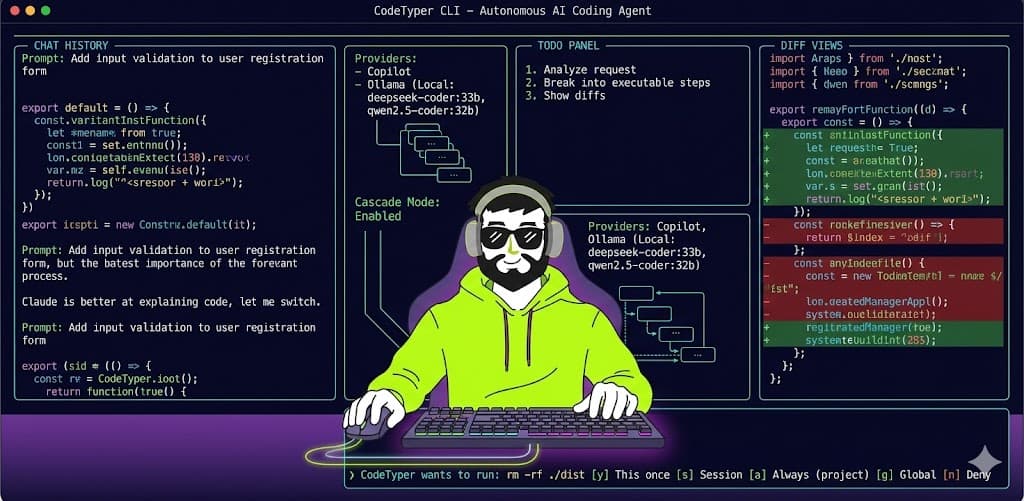
CodeTyper CLI is a full-screen terminal UI that acts as an autonomous AI coding agent. You describe what you want, and it:
- Analyzes your request
- Breaks it into executable steps
- Reads files, writes code, runs bash commands
- Shows you diffs before applying changes
- Asks for permission when needed
But the killer feature? The cascading provider system that learns which AI provider performs better for different task types.
Two Ways to Use It: Copilot or Ollama
Option 1: GitHub Copilot Subscription
If you have a GitHub Copilot subscription, CodeTyper CLI can use it directly—no Neovim, no VS Code, just pure terminal power.
Setting it up:
# Install CodeTyper CLI
npm install -g codetyper-cli

# Login with GitHub
codetyper login copilot
When you run the login command, it initiates GitHub's device flow:
- You get a code and a URL
- Visit github.com/login/device
- Enter the code
- CodeTyper CLI polls for the token and saves it securely
That's it. You now have access to GPT-5, GPT-5-mini, Claude variants, and Gemini models—all through your existing Copilot subscription.
What models are available?
codetyper models copilot
This shows you all available models including:
- GPT-5, GPT-5-mini (unlimited usage)
- GPT-5.2-codex, GPT-5.1-codex
- Grok-code-fast-1
- Claude and Gemini variants
The CLI handles rate limiting, token refresh, and quota management automatically. When you hit limits, it backs off and retries with exponential delays.
Option 2: Local Ollama Models (Zero Cost, Full Privacy)
This is where things get interesting for the privacy-conscious (or budget-conscious).
If you have Ollama running locally, CodeTyper CLI can use your local models with zero API calls to external services.
Setting it up:
# Make sure Ollama is running
ollama serve

# Login (really just validates the connection)
codetyper login ollama
The CLI talks to Ollama's local API at http://localhost:11434. No authentication required—it's your machine, your models.
Pulling models:
# List what models you have
codetyper models ollama

# If you need a model, Ollama pulls it automatically
# Or you can pull manually:
ollama pull deepseek-coder:33b
ollama pull codellama:13b
ollama pull qwen2.5-coder:32b
I personally run deepseek-coder:33b for most tasks and qwen2.5-coder:32b for complex refactoring. Both run surprisingly well on my M3 Max.
The Secret Sauce: Cascading Provider System
Here's where I get excited. The cascading provider system tracks quality scores for each provider based on task type.
How it works:
Every time you interact with CodeTyper CLI, it:
- Detects the task type from your prompt (code generation, bug fix, refactoring, testing, documentation, explanation, or review)
- Checks the quality scores for that task type
- Routes to the best provider based on those scores
The routing logic is simple but effective:
| Quality Score | Routing Decision |
|---|---|
| >= 85% | Ollama only (trusted for this task) |
| 40-85% | Cascade mode (Ollama + Copilot audit) |
| < 40% | Copilot only (Ollama needs improvement) |
What's cascade mode?
This is the clever part. When scores are in the middle range:
- Ollama generates the response (fast, free, local)
- Copilot audits the response for issues
- If Copilot finds problems, you get a better response
- Scores update based on the outcome
Over time, if Ollama consistently produces good refactoring code, its score goes up, and eventually it handles all refactoring tasks alone. If it struggles with test generation, Copilot takes over those tasks.
How scores update:
The system watches your feedback patterns:
- Explicit approval: +1 to success count
- Minor correction requested: -1 (correction count)
- Major correction needed: -2
- Full rejection: -3
It also detects implicit feedback in your messages:
- "Thanks", "perfect", "great", "works" → positive signal
- "Fix this", "wrong", "doesn't work" → negative signal
Score = successCount / (successCount + correctionCount + rejectionCount)
Scores decay by 1% every 7 days to prevent stale data from dominating.
Daily Workflow
Here's how I actually use CodeTyper CLI day-to-day:
Starting a session:
# Start in current directory
codetyper

# Or with an initial prompt
codetyper "add input validation to the user registration form"
In the TUI:
The full-screen interface shows:
- Chat history with syntax-highlighted code
- Diff views for file changes
- Todo panel for complex tasks
- Permission prompts for sensitive operations
Keyboard shortcuts I use constantly:
Enter— Send messageShift+Enter— New line in message/— Open command menuCtrl+Tab— Toggle between Agent/Ask modesCtrl+T— Toggle todo panel
Slash commands:
Inside the TUI, press / and you get:
/model— Switch models mid-conversation/provider— Switch between Copilot and Ollama/save— Save the conversation/usage— Check token usage/remember— Save something to project learnings
The Permission System
I built a granular permission system because I don't want AI autonomously deleting my production database.
How it works:
When CodeTyper wants to do something sensitive, it asks:
CodeTyper wants to run: rm -rf ./dist
[y] This once  [s] Session  [a] Always (project)  [g] Global  [n] Deny
Pre-configuring permissions:
# Allow all git commands globally
codetyper permissions allow "Bash(git:*)"

# Allow npm commands for this session
codetyper permissions allow "Bash(npm:*)"

# Allow writing to src/
codetyper permissions allow "Write(src/*)"
Protected paths (can't be modified by default):
.gitnode_modules.env*dist,build,.next__pycache__,venv
Configuration
Global config lives at ~/.config/codetyper/config.json:
{
  "provider": "copilot",
  "model": "auto",
  "theme": "tokyo-night",
  "cascadeEnabled": true,
  "maxIterations": 20,
  "timeout": 30000
}
Project-specific config goes in .codetyper/ in your repo:
rules/— AI instructions specific to this projectagents/— Custom agent configurationsskills/— Custom slash commandslearnings/— What the AI has learned about your codebase
Themes (because I spend all day in the terminal):
14 built-in themes including dracula, nord, tokyo-night, gruvbox, catppuccin, rose-pine, and my personal favorite: cargdev-cyberpunk.
codetyper config set theme tokyo-night
Why I Built This
I wanted an AI coding tool that:
- Works in the terminal — I live in tmux and Neovim
- Respects my privacy — Local models when possible
- Gets smarter — Learns from my feedback
- Asks permission — Doesn't autonomously wreck my code
- Supports multiple providers — Use the best tool for each job
The cascading system is the heart of this. After a few weeks of use, my local deepseek-coder:33b handles 80% of my tasks because it's learned what it's good at. Copilot kicks in for the complex architectural questions and code review.
What's Next
I'm actively working on:
- MCP server integration for extended tool capabilities
- Better task planning for complex multi-file changes
- Team sharing for quality scores and learnings
- More provider support (Anthropic API, OpenAI API, local llama.cpp)
The code is open source. If you're interested in contributing or just want to see how the cascading system works under the hood, check out the repository.
Final Thoughts
Building CodeTyper CLI taught me that the future of AI coding tools isn't about picking the "best" model. It's about intelligent routing—using the right model for the right task, learning from feedback, and getting out of the developer's way.
If you try it out, I'd love to hear what you think. Especially interested in how the quality scores evolve for your specific workflow.
Happy coding.



Comments ()